WebTable
Download
WebTable
Home
What
is
WebTable?
- WebTable extracts tables from a web page file. The resulting tables
can be imported into a spreadsheet or database program.
Why
use
WebTable?
- It can be difficult to transfer web table data into user data.
Sometimes a single web page has many tables, which makes it even more
difficult. The WebTable utility helps automate the transfer by
translating a saved web page file into a set of text files that can be
imported into a spreadsheet or database. Each web page table is
translated into a separate file with an associated caption or cell(1,1)
text for identification. The web table information is filtered and
translated into printable text. WebTable can display the contents of
each translated file for proper identification. WebTable automation
improves the accuracy of information transfer and eliminates the
tedious job of manual data transfer.
How
do I use
WebTable?
- First save the web
page from
the Browser using the
"File SaveAs" command (remember the file name and where it is saved).
- Now start WebTable
with Start
| Programs | WebTable
- Click the "Read Web
File"
button and browse to
open the previously saved file
- The output files
will be saved
in the listed
output director. If you want to output to a different directory, edit
the output directory text, or click the "Output Directory" button to
browse to a directory
- Click the "Start"
button to
extract the tables.
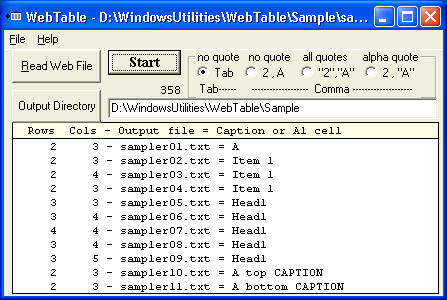
The tables in the web page file are extracted and saved with the same
file name appended with an indexed character and .txt extension. For
example, if the web file is "Sample.htm" then the extracted table files
will be "Sample1.txt", "Sample2.txt", ....
- The items in the
text files
are separated with a
Tab or a Comma as selected by the option box. Comma separated items can
be enclosed in "quotes", or only have "alpha" items in "quotes", or
have no quotes
- The Table files are
listed as
they are extracted
with columns, rows, txt filename, and table caption or cell(1,1)
- WebTable extracts
tables
within tables first and
then extracts the outer tables
- A table file can be
displayed
by double-clicking
the file name.
- The extracted text
files can
now be imported into
a data program such as Excel.
- From Excel,
browse for
files of type Text
(*.txt).
- Open the
extracted text
file (e.g. Sample1.txt)
- This starts the
Text
Import wizard. Follow the
wizard steps to import the file into the data application
- Menu
WebTable
has the following menus and submenus
File: Input File; Output File; Exit
Help: How to Use; About
The location and size
of the
WebTable program can be
adjusted by grabbing an edge and dragging the window to the new
location and size. The options and environment are saved when WebTable
exits.
Note, WebTable can
be called
from a command file
with a filename (including path) as an argument. WebTable exits to the
command processor after processing the file. ErrorLevel 2 is passed to
the command processor if the file is not found.
>>Home