JoinLine Download JoinLine Home
What is JoinLine? - JoinLine fixes text files with long, fixed-length records and unwanted line wraps
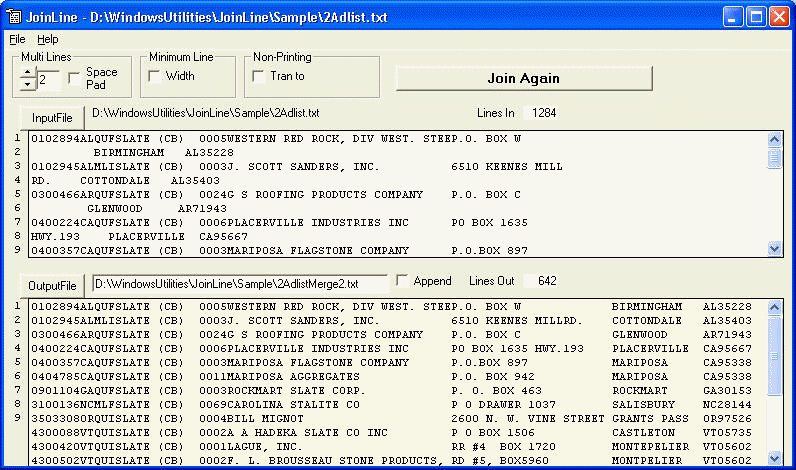
Why use JoinLine? - Spreadsheets and database programs import individual text records with data on the same line. However, sometimes text lines are wrapped before the end of the record. If these records always wrap to the same number of lines, then JoinLine can restore the wrapped records to single line records. For example, suppose a data set has fixed length text records of 200 characters, but when the records are transferred the transfer program inserts unwanted line-returns to force all lines to be less than 80 characters. Then each text record becomes 2 lines of 80 characters and 1 line of 40 characters. That is, each text record has been broken into 3 lines. JoinLine can fix this by merging each sequential group of 3 lines into the original single line record. A space-pad character can be inserted between merged lines; input lines can be padded to a minimum length; and non-printing characters can be translated into a space or other character. JoinLine writes the merged line result to a new file or appends to an existing file.
How to use JoinLine? - Start JoinLine with Start | Programs | JoinLine
Click "InputFile" to find and preview the input file
Select the number of "# Multi-Lines" in the input file
Check "Space Pad" if a space is needed between merged lines
Check "Min Width" and enter the minimum width to pad with spaces for a minimum input line width
Check "Non-Printing Tran to" to translate non-printable characters to:
a space if Space is checked
a user-defined character such as # if Space is not checked
Edit the Output "File Name" and/or Click "OutputFile" to find an existing output file
Check "Append" to append the output file to a previous file; otherwise a new output file is created
Click "Join Lines" to output the merged-line file
Menu JoinLine has the following menus and submenus
File: Input File; Output File; Exit
Help: How to Use; About
The location and size
of the
JoinLine program can be
adjusted by grabbing an edge and dragging the window to the new
location and size. The options and environment are saved when JoinLine
exits.
>>Home